
Getting started for agents#
This page is for coding agents (Claude Code, Codex, pi, and others) that run inside mpmux, and for the people who set them up. It shows how an agent finds out that it runs in mpmux, which commands it can use, and how to set up the agents so that mpmux shows their turns.
People: chapter 6 shows how to work with agents from
the desk and the tablet. To hand this page to an agent, add the snippet at
the end to your AGENTS.md or CLAUDE.md.
Am I inside mpmux?#
mpmux sets MPMUX_SOCKET_PATH in every pane. If it is set, mpmux-cli
reaches the window you run in:
test -n "$MPMUX_SOCKET_PATH" && mpmux-cli status
In a hosted session (one that runs in mpmux-sessiond, see
chapter 3), mpmux also sets
MPMUX_HOSTED_SESSION_ID. MPMUX_SOCKET_PATH then points to the session
host, which passes commands on to the window attached to the session. The
commands below work the same way in both cases. If no window is attached at
the moment, commands that need one fail; the session itself keeps running.
Look and act#
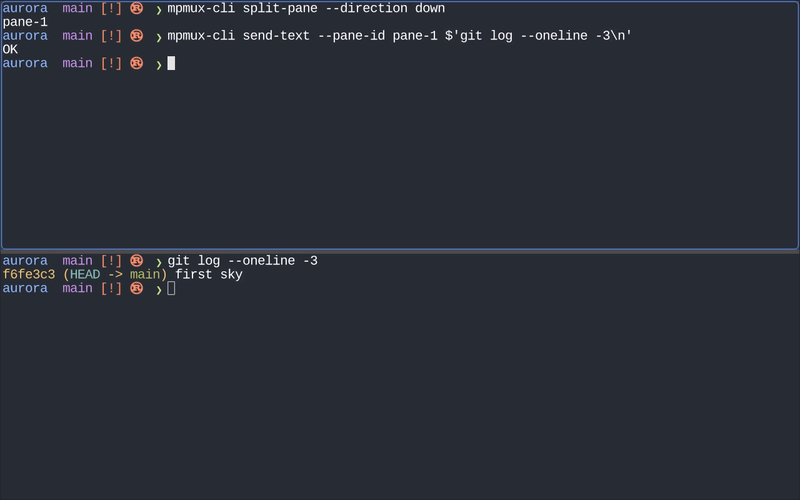
mpmux-cli list-panes                          # JSON: pane ids, sizes, cwd, active pane
pane=$(mpmux-cli split-pane --direction down) # prints the new pane id
mpmux-cli send-text --pane-id "$pane" $'cargo test\n'
mpmux-cli capture-pane --pane-id "$pane"      # the visible screen as text
mpmux-cli send-keys --pane-id "$pane" C-c     # tmux-style key names
mpmux-cli new-tab
Use a separate pane for long-running work (a dev server, a test watcher) and
read it with capture-pane instead of blocking your own shell.
Talk to the person#
mpmux-cli display-message 'Tests pass; ready for review'
mpmux-cli display-dialog 'Deploy?' 'All checks passed. Deploy to staging?'
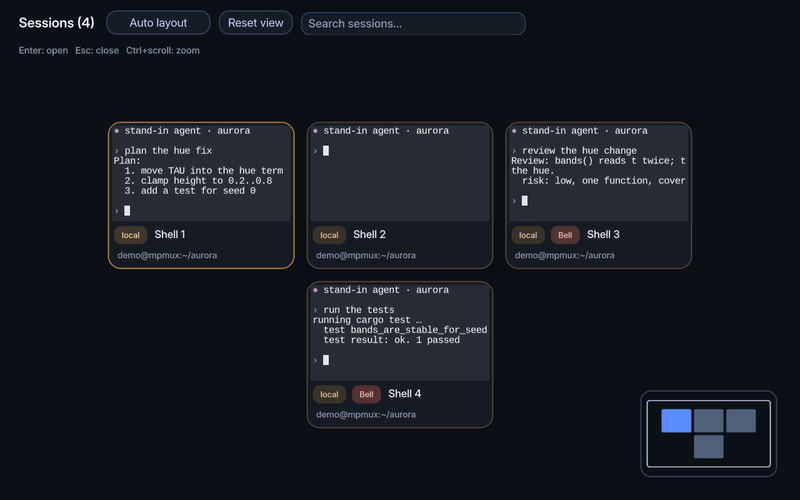
A bell (printf '\a') marks your session in the overview, so the person sees
which agent waits for them:
Show your results in the Viewer#
The Viewer is a panel beside the terminal. Show a chart, a table, a document or a page there instead of describing it:
mpmux-cli media show plot.png                 # prints ▣ plot.png · mpmux-media://plot.png
mpmux-cli media show results.csv --title "Test results"
mpmux-cli media show ./report/                # report/index.html with its files
mpmux-cli media console                       # what that page logged: check it works
mpmux-cli media show life.wasm                # an interactive canvas guest
Showing the same file again updates it in place. A Markdown document that
links to files next to it brings them along, and the person opens them with
a tap. In a hosted session the session host keeps the objects, so they
reach the tablet too. The media skill (mpmux-cli agents install installs
it, with mpmux's other agent integrations) says when to use which kind, and
guide chapter 11 how to write a canvas guest.
Wait for events instead of polling#
mpmux-cli wait-for-events --help
Subscribe to the events you need and wait for the next one; do not loop with
sleep. Attach as a client first (--client-id, attach, acquire-control);
once any client is attached, commands that change the window need the control
lease. Steps and examples: mpmux-cli reference.
Report your status#
Tell mpmux what you are doing with the program status protocol (OSC 7501, https://www.superlogical.com/rex/docs/build/program-status). The overview then shows on your card whether you work, wait for the person, finished, or failed, and a progress value draws a bar on top of your pane:
status() {   # status <idle|working|blocked|done|error> [message] [extra pairs]
  printf '\e]7501;state=%s:app=my-agent:msg=%s%s\e\\' "$1" \
    "$(printf '%s' "$2" | base64 | tr -d '\n')" "${3:+:$3}"
}
status working "Running the test suite" progress=40
status blocked "Apply the migration?" kind=permission
status done "All 213 tests pass"
- Each report replaces the last one completely; send
appevery time. blockedtakeskind=permission,question, orauth.- Messages are base64 UTF-8, one line, no control characters; never put secrets or prompts in them.
workingandblockedend at the next shell prompt or when you exit;doneanderrorstay until the person has looked.- mpmux answers the support query
printf '\e]7501;?\e\\'with the same sequence, also in hosted sessions.
For a plain progress bar without a status, OSC 9;4 works too:
printf '\e]9;4;1;56\a' (56 %), \e]9;4;3\a (busy), \e]9;4;0\a (done).
mpmux-cli list-panes includes what each pane reported, under
program_status.
Mark your turns in the scrollback#
mpmux can jump between prompts (Ctrl+Shift+PageUp / PageDown) and show them in
the scroll map ([host-ui] scroll-map = true). It needs marks in the
terminal output:
- Any program:
printf '\e]1337;SetMark\a'marks the current line; mpmux labels it with the first line that follows. - pi marks prompts and answers itself in its inline mode: set
"tuiMode": "regular"in~/.pi/agent/settings.json. - Claude Code: set
"tui": "default"in~/.claude/settings.jsonand add the prompt hook that ships with mpmux:
json
  "hooks": {
    "UserPromptSubmit": [
      { "hooks": [ { "type": "command",
        "command": "~/dev/ai/mpmux/scripts/agents/claude-code-prompt-mark.sh" } ] }
    ]
  }
Full-screen agent interfaces draw on the alternate screen, which keeps no scrollback; marks and the scroll map only work in the inline modes.
Keep secrets out of the terminal#
Do not print, log, or paste pairing invites, short codes, device tokens,
admin tokens, or anything under ~/.config/mpmux/auth/ and
~/.config/mpmux/signing/. Screen captures and the overview show what you
print, and other devices may be watching the session.
Snippet for AGENTS.md or CLAUDE.md#
## mpmux

You may run inside mpmux, a terminal multiplexer. If `$MPMUX_SOCKET_PATH` is
set, `mpmux-cli` controls the window you run in:
- `mpmux-cli list-panes` lists panes (JSON); `mpmux-cli split-pane` prints the
  new pane id.
- Run long jobs in their own pane: `mpmux-cli send-text --pane-id P $'cmd\n'`,
  then read it with `mpmux-cli capture-pane --pane-id P --start-line -40`.
- Tell the user about results with `mpmux-cli display-message '…'`; ring the
  bell (`printf '\a'`) when you need an answer.
- Show charts, tables, documents and pages in the Viewer:
  `mpmux-cli media show <file>` (again to update it).
- Never print pairing invites, short codes, or tokens.
Further reading#
-
mpmux-cli reference: every command, with recipes.
-
Chapter 10: Automate: layouts, messages, dialogs.
- Host-control reference: every request and event.
- Extension architecture: your own sidebars and dialogs inside mpmux.