
12. Todos: plan work with your agent#
In this chapter you keep a task list together with a coding agent: the agent writes down the work, you see it in a sidebar, pick the next piece, and send the agent off to do it. The list lives in your project, so it outlasts the agent's session: tomorrow's agent picks up where today's stopped.
What a todo is#
A todo is a small file in your project's .pi/todos/ folder, one per task:
.pi/todos/
  9a4d2b67.md     Overview: sessions as cards        (a parent)
  0e5b8c3a.md       "+" card that starts a new session (its child)
  71d0b4e8.md       Keep cards of background tabs live
Each file has a title, tags (#overview, #ui), a status (open, in
progress, closed), and notes in Markdown: what to do, what was decided, what
is done. Its id is the file name, written TODO-9a4d2b67.
Two more things make the list useful for working with an agent:
- Claims. An agent claims the todo it works on, so a second agent (or a second session) does not start on the same thing. The sidebar shows which todos are assigned; Claim in the sidebar assigns a todo to the agent the sidebar belongs to, Release gives it back.
- Parents and children. Big work is a parent todo with child todos for
its steps. A child names its parent in its notes (
Parent: TODO-9a4d2b67); the sidebar shows the children under the parent.
You and the agent share the same files. The agent changes them through its todo tool; you change them in the sidebar, or with any editor. Because they are plain files in the project, you can commit them with the code.
The sidebar#
Open the todos sidebar with Todos in the pie menu (up right), or type
/todos-sidebar in the agent (Pi, or Claude Code with mpmux's command; see
Set it up).
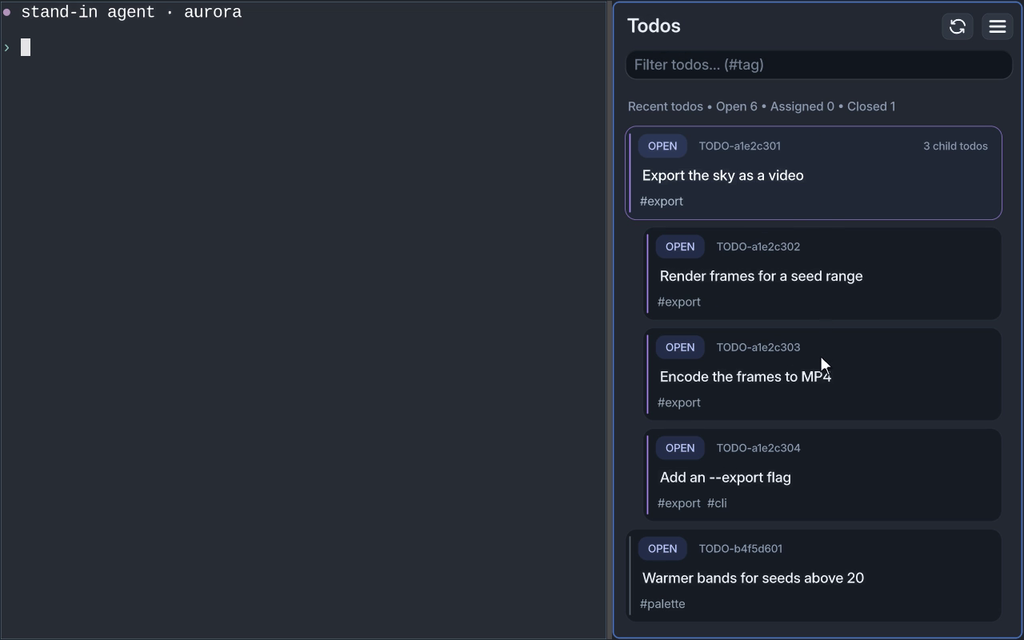
| Action | How |
|---|---|
| Find a todo | Type in the filter field at the top: words from the title, tags or notes, or #tag |
| Show todos by status | The chips under the field: Open (the default), In progress, Mine (assigned to this agent), Claimed (assigned to any agent), Closed, All. Or type is:closed, is:mine and so on into the field. The sidebar remembers the chip for each project |
| Move | ↑ and ↓ |
| Open or close a parent | → and ←, or double-click it |
| See a todo and act on it | Enter, or double-click a todo without children: a dialog with its status, id and tags as chips at the top (the status in the colour of its pill in the list), a line on who works on it and when it changed, its parent and steps (with how many are done), its notes, and Work on, Refine, Claim, Close (Reopen when closed). The notes leave out a Parent: TODO-… line or a ## Children list the dialog shows above them. The dialog grows with the window. Todo ids in it are links: a parent, a step, a TODO-… in the notes opens that todo; Copy ID, Show in the Viewer and Open file (the todo's .md in your $VISUAL or $EDITOR, in a new pane beside the agent's) are links at the end of its facts; closing the todo in the Viewer brings the todos back |
| All actions at once | Hold a todo (click and hold, or touch and hold): a pie menu with Work on, Refine, Claim, Close (Reopen on a closed todo), Copy ID, View |
| Reload | The refresh button next to the menu |
The list starts with the work in progress, marked Working on: todos in progress and todos assigned to this agent. Then come what was worked on recently and the rest of the open todos. The line above it counts open, assigned and closed todos. Closed todos stay out of the list until you pick Closed or All; that is how you look up what was done.
Work together#
A typical loop:
- You describe the work in the agent pane: "Plan the export feature as todos: a parent and one child per step."
- The agent writes the todos. They appear in the sidebar at once, the children under their parent.
- You pick the next step in the sidebar and choose Work on. mpmux
types
work on todo TODO-1234abcd "Title"into the agent pane and sends it. If the agent is busy, the prompt waits until its turn ends. - The agent claims the todo, works on it, writes what it did into the todo's notes, and closes it. The sidebar follows along.
- Not clear enough yet? Choose Refine instead: the agent asks you questions about the todo first and writes the answers into it before anyone starts.
Some habits that help:
- Ask the agent to write decisions and findings into the todo, not only into the chat. The next session reads the todo, not the old chat.
- Keep a parent for each larger piece of work and let the agent add children as it finds steps. The sidebar does not close a parent while a child is still open.
- Use tags for areas (
#ui,#release) and filter by them when the list grows.
On a tablet or phone#
The same sidebar works by touch. Tap a todo to select it, double-tap a parent to open it, touch and hold a todo for its pie menu, and choose Work on: the prompt goes to the agent in the session, which may run on a server. On a phone the sidebar covers the screen; Restore Panel in its menu puts the terminal back beside it.
The todos and the agent's run monitor are two panels. Switch between them in the dock menu (☰), or choose Split Panel there to see both: the todos in one half, the run in the other.
Set it up#
mpmux comes with its agent integrations. Install them into your agents once:
mpmux-cli agents install
It registers them with Claude Code and Pi, whichever is installed, and
both load them from mpmux's own folder: when you update mpmux, they are
updated too. mpmux-cli agents status shows what is installed. The todos
sidebar needs Node 22.18 or newer.
Pi gets a todo tool (list, get, create, update, append, claim,
release, delete; closing is an update of the status) and the
/todos-sidebar command. Pi uses the tool on its own when you talk about
todos.
Claude Code gets the /todos-sidebar command. It has no todo tool: it
reads and writes the files in .pi/todos/ directly. Tell it how, in your
CLAUDE.md or AGENTS.md:
## Todos

Todos are files in `.pi/todos/<id>.md`: a JSON block (id, title, tags,
status, created_at, updated_at, assigned_to_session) and Markdown notes
after it. "work on todo TODO-<id>" means: read that file, set its status to
"in_progress", do the work, write what you did into its notes, and set the
status to "closed" when it is done. A step of a larger todo is its own todo
whose notes say `Parent: TODO-<parent id>`.
Other agents can do the same: anything that reads and writes the files
takes part, and mpmux-cli todos-sidebar runs the sidebar for them.
If you set the integrations up by hand before (links or copies from an
mpmux checkout), mpmux-cli agents status lists those copies: remove them,
or the agent loads both.
Next#
Back to the guide's overview, or look things up in the reference.